Google Reveals How Googlebot Really Works: 2MB Crawl Limit, Rendering & Hidden SEO Impact (2026 Official Breakdown)
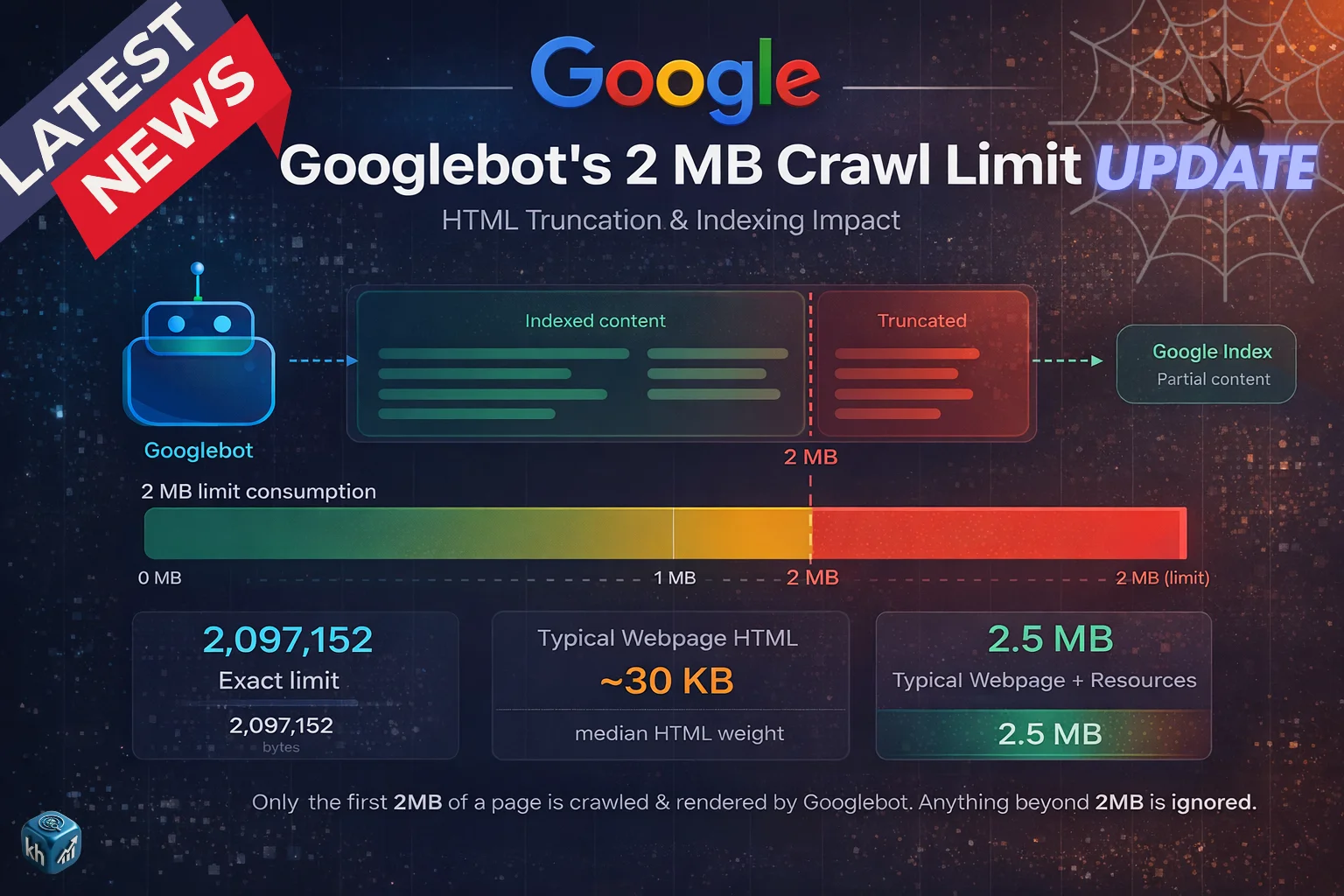
On March 31, 2026, Google published a detailed explanation of how its crawling system works, offering one of the clearest insights into how websites are fetched, processed, and prepared for indexing.
The blog, titled “Inside Googlebot: demystifying crawling, fetching, and the bytes we process,” explains how Googlebot operates internally, including a critical technical limitation that directly affects SEO:
👉 Googlebot only processes the first 2MB of a webpage
This is not a theory or speculation — it is officially confirmed by Google.
This single detail has major implications for how websites should be structured, optimized, and evaluated for search visibility. (Source)
What Google Actually Revealed
Google’s explanation focuses on three core stages:
- Crawling (fetching content)
- Rendering (processing content)
- Byte-level limitations (what is actually seen)
Unlike previous high-level documentation, this update dives into how much of your page Google actually reads, and what happens to the rest.
Googlebot Is Not What Most People Think
For years, “Googlebot” has been treated as a single crawler visiting websites. Google has now clarified that this is not accurate.
Googlebot is part of a centralized crawling infrastructure used by multiple Google services.
This means:
- Google Search uses it
- Google Shopping uses it
- AdSense and other services also rely on it
What appears as “Googlebot” in server logs is just one client of a much larger system.
This clarification matters because it shows that crawling is not a simple one-bot process, but a shared, scalable infrastructure handling multiple products simultaneously.
The 2MB Limit: The Most Important SEO Insight
The most critical part of Google’s explanation is the 2MB crawl limit.
Official Rule
Googlebot fetches:
- Up to 2MB of content per URL
- This includes HTML + HTTP headers
For comparison:
- PDFs → up to 64MB
- Other crawlers → default 15MB
This means your entire webpage is not fully read — only the first portion.
What Happens After 2MB
Google clearly explains how the system behaves when a page exceeds this limit.
The crawler does not reject the page. Instead:
- It stops fetching at exactly 2MB
- The fetched portion is treated as the full page
- Anything beyond that is completely ignored
Important Consequences
- Content after 2MB is:
- Not crawled
- Not rendered
- Not indexed
👉 In Google’s system, it effectively does not exist.
This is one of the most important technical confirmations Google has ever shared.
How Rendering Works (WRS Explained)
After crawling, the content is passed to Google’s Web Rendering Service (WRS).
This system behaves like a modern browser and is responsible for:
- Executing JavaScript
- Processing CSS
- Building the final page structure
However, there is a major limitation:
👉 WRS can only process what was fetched
If important content lies beyond the 2MB limit, it will never reach the rendering stage.
External Resources: A Key Advantage
Google clarifies that external resources behave differently.
- CSS files
- JavaScript files
- Other resources
These are fetched separately and have their own limits.
Why This Matters
- External files do NOT count toward the main HTML size
- This allows better optimization if content is structured correctly
Real SEO Problem Google Highlights
Google explicitly warns about a major issue many websites face.
If a page includes:
- Large inline CSS
- Base64 images
- Heavy inline JavaScript
- Massive navigation menus
It can push important content below the 2MB threshold.
Result
- Critical content may not be seen
- Structured data may be ignored
- Rankings may suffer
👉 This is not an algorithm issue — it is a visibility issue
Example Scenario (Based on Google Logic)
🔴 Poorly Structured Page
- Large scripts at top
- Heavy inline code
- Content starts late
Outcome:
- Google reads only technical clutter
- Main content is missed
- Page underperforms
🟢 Optimized Page
- Clean HTML
- Important elements at top
- External resources used
Outcome:
- Google sees key content
- Better understanding
- Improved ranking potential
Best Practices Recommended by Google
Google provides clear technical guidance for website owners.
1. Keep HTML Lightweight
- Avoid large inline code blocks
- Move CSS/JS to external files
2. Prioritize Content Order
Place critical elements early in HTML:
- Title tag
- Meta tags
- Canonical tags
- Structured data
This ensures they are included within the 2MB limit.
3. Monitor Server Performance
Google notes that:
- Slow servers → reduced crawl rate
- Lower crawl frequency → slower indexing
4. Avoid Content Bloat
Keep your page efficient by avoiding:
- Unnecessary scripts
- Redundant elements
- Overloaded design structures
JavaScript & Dynamic Content Limitations
Google also highlights a critical behavior of its rendering system.
The Web Rendering Service:
- Operates without session memory
- Clears local storage between requests
What This Means
- Dynamic elements may not behave as expected
- JavaScript-heavy pages must be carefully structured
Why This Update Matters for SEO in 2026
This insight changes how SEO should be approached at a technical level.
Key Shift
SEO is no longer just about:
- Keywords
- Backlinks
It is also about:
👉 Whether Google can actually see your content
Connection With Core Updates
This crawling insight directly connects with Google’s core updates.
- Core updates improve content evaluation
- Crawling determines what content is available for evaluation
If Google cannot crawl your content:
- It cannot rank it
- No matter how good it is
What To Do If Your Content Is Not Ranking
Based on Google’s explanation, the solution is technical and structural.
Step-by-Step Fix
- Analyze HTML size
- Reduce unnecessary code
- Move inline assets externally
- Ensure content appears early
- Test crawlability
How to Keep Your Website Safe
To align with Google’s system:
- Keep pages clean and efficient
- Structure content properly
- Avoid heavy inline elements
- Focus on accessibility for crawlers
Long-Term SEO Insight
Google’s message is clear:
👉 Crawling is not unlimited
👉 Visibility depends on structure
👉 Efficiency matters as much as quality
FAQs
Googlebot fetches up to 2MB of HTML per page.
It is ignored and not indexed.
Yes, if important content is not crawled.
Google says it may change in the future.
Optimize HTML size and place important content early.
Author
Harshit Kumar is an AI SEO Specialist with 7+ years of experience and the founder of kumarharshit.in. He specializes in technical SEO, indexing systems, and decoding Google updates into actionable strategies.
Leave a Reply