EmDash CMS Explained: Cloudflare’s Serverless CMS, Architecture, Features & Complete Setup Guide
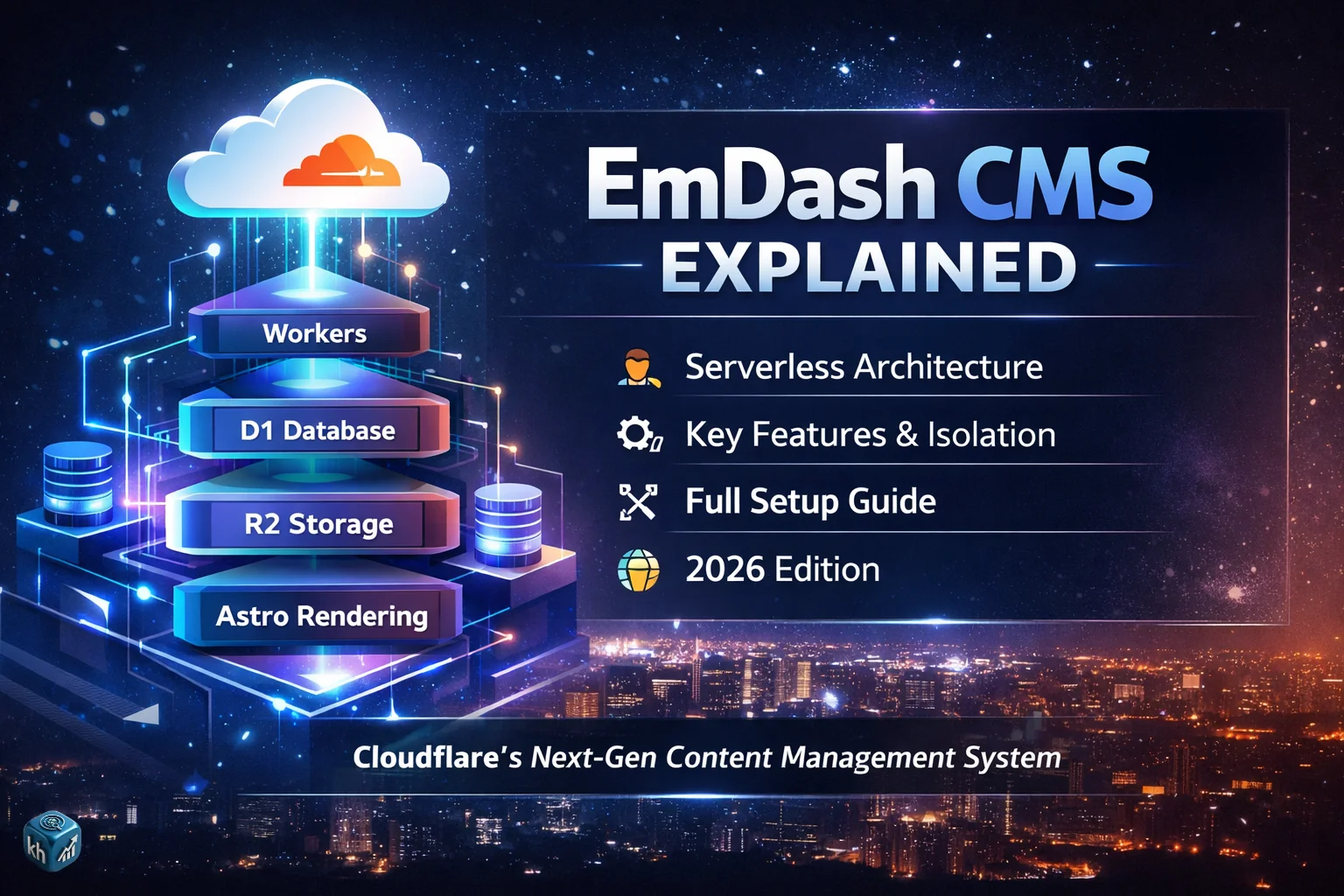
Understanding What EmDash Is, Why It Exists, and How It Redefines CMS Architecture
📌 The Shift That Led to EmDash
Over the past decade, the web hasn’t just evolved — it has fundamentally transformed. Earlier, websites were built on centralized infrastructure. You had a server, a database, and an application layer, all tightly connected. Every request traveled to a fixed location, got processed, and returned a response.
That model worked — until scale, performance, and security became serious challenges.
Today, users expect content to load instantly from anywhere in the world. At the same time, developers want flexibility, automation, and systems that integrate with AI. This shift has pushed the web toward edge computing and serverless architecture, where code runs closer to the user instead of a central server.
Cloudflare has been at the center of this transition for years, building infrastructure that distributes workloads globally. EmDash emerges directly from this philosophy — not as an incremental upgrade, but as a system designed for this new reality. (source)
🧾 What Exactly Is EmDash?
EmDash is an open-source content management system built specifically for a serverless, edge-first world. Instead of relying on traditional servers, it operates on Cloudflare Workers, which execute code across a global network.
This changes the very definition of what a CMS is.
Rather than being a monolithic application that controls everything — from content storage to rendering — EmDash separates responsibilities. Content is structured, rendering is flexible, and execution happens dynamically at the edge.
In practical terms, this means:
- Your website is not tied to a single server
- Your content is not locked into a single format
- Your system can scale automatically without manual infrastructure
But more importantly, EmDash is not just about performance. It is about rebuilding trust and control in how content systems operate, especially when it comes to extensibility and security. (source)
🏢 Who Built EmDash and Why It Matters
EmDash is developed by Cloudflare, a company known for operating one of the largest global networks on the internet.
Cloudflare’s core expertise lies in:
- Distributed systems
- Edge computing
- Security infrastructure
- Network optimization
Because of this, EmDash is not an isolated product. It is deeply integrated into Cloudflare’s broader ecosystem, including Workers, R2 storage, and D1 database.
This matters because most CMS platforms are built as standalone tools. EmDash, on the other hand, is designed as a native part of an edge infrastructure stack.
That’s a completely different starting point — and it shapes everything from how it runs to how it scales.
🎯 The Core Motivation Behind EmDash
To understand EmDash properly, you have to understand the problem it is trying to solve.
Cloudflare’s official explanation makes it clear that existing CMS models are not aligned with how the modern web works. The issue is not just outdated technology — it is architectural mismatch.
Traditional systems assume:
- A persistent server environment
- Full trust in extensions
- Tight coupling between components
But modern systems require:
- Stateless execution
- Controlled environments
- Decoupled architecture
EmDash is designed to bridge this gap.
Instead of patching old systems, it starts from scratch with a new model. One where every part of the system — from content storage to execution — is built around security, scalability, and flexibility from the ground up.
⚙️ Rethinking CMS Architecture
At its core, EmDash changes how a CMS is structured.
In older models, everything is bundled together. The CMS manages the database, processes logic, renders HTML, and allows plugins to interact with everything.
EmDash breaks this apart.
Execution happens in Cloudflare Workers, which are lightweight, isolated environments. These Workers handle incoming requests, process logic, and generate responses.
Content is stored separately in structured formats. Instead of mixing content with presentation, EmDash treats content as data — something that can be reused, transformed, and delivered in different ways.
Rendering is handled through Astro, a modern framework that allows flexible output generation.
The result is a system where:
- No single component controls everything
- Each layer has a clear responsibility
- Failures are isolated instead of cascading
This modular approach is not just cleaner — it is significantly more resilient. (source)
🔄 How EmDash Processes a Request
To truly understand how EmDash works, it helps to follow a request from start to finish.
User opens a website
→ Request goes to Cloudflare edge
→ Worker executes EmDash logic
→ Data is fetched from D1 or R2
→ Content is rendered via Astro
→ Response is sent back instantly
What makes this powerful is where it happens.
Instead of traveling to a central server, the request is handled at the nearest edge location. That reduces latency and improves performance globally.
At the same time, because Workers are stateless, they only run when needed. There is no always-on server consuming resources in the background.
This is a major shift from traditional execution models.
⚡ The Serverless Foundation
One of the defining characteristics of EmDash is that it is fully serverless.
But “serverless” does not mean there are no servers. It means you, as a developer or site owner, do not manage them.
In a traditional setup, you have to think about:
- Hosting
- Scaling
- Load balancing
- Maintenance
With EmDash, those concerns are abstracted away.
When a request comes in, the system automatically executes the required logic. When there are no requests, nothing runs. This leads to better resource utilization and lower operational complexity.
More importantly, scaling becomes automatic. Whether you have ten users or ten million, the system adapts without manual intervention.
This is one of the core reasons Cloudflare built EmDash the way it did — to align CMS behavior with modern infrastructure capabilities.
🔐 Security as a First-Class Principle
Security is not an afterthought in EmDash. It is a foundational design decision.
In many traditional systems, extensibility comes at the cost of security. When you allow external code to run inside your application, you are effectively expanding your attack surface.
EmDash addresses this by isolating execution.
Instead of allowing extensions to interact freely with the system, each one runs in a controlled environment. These environments are based on V8 isolates, which are designed to keep code execution separate and secure.
This means:
- One component cannot interfere with another
- Access to sensitive resources is restricted
- Failures remain contained
The idea is simple but powerful: give developers flexibility without compromising safety.
This balance is difficult to achieve in older architectures, but EmDash makes it a core part of its design.
🧠 A New Way to Think About Content
Another major shift in EmDash is how content is handled.
Instead of storing content as raw HTML, EmDash treats it as structured data. This allows content to be separated from how it is displayed.
Why does this matter?
Because the same content can now be:
- Rendered differently on different platforms
- Consumed by APIs
- Processed by AI systems
This approach makes content more flexible and future-proof.
It also aligns with how modern applications work, where data flows between systems rather than being locked into a single format.
EmDash embraces this model fully, making structured content a central part of its architecture.
At this stage, one thing should be clear: EmDash is not just another CMS.
It represents a shift in how content systems are designed — moving away from monolithic, server-dependent models toward distributed, modular, and secure architectures.
In this first part, we’ve covered:
- The evolution of the web that led to EmDash
- What EmDash is and how it is positioned
- The core architectural changes it introduces
- How it processes requests and operates at the edge
- Why serverless and security are central to its design
But this is just the foundation.
Internal Components, Execution Model, Plugin Isolation & Content System Explained
As we move deeper into EmDash, it becomes important to go beyond the surface and understand what actually powers the system internally. The real strength of EmDash does not lie in just being serverless or edge-based — it lies in how its components are designed to work together without creating tight dependencies.
This is where EmDash starts to feel fundamentally different.
🧱 The Core Components That Power EmDash
At the heart of EmDash is a combination of Cloudflare’s infrastructure products, each playing a specific role. Instead of bundling everything into a single application layer, EmDash distributes responsibilities across specialized systems.
Execution is handled by Workers. Data persistence is managed through D1 and R2. Rendering is handled through Astro. Each of these pieces operates independently, yet they are orchestrated in a way that feels seamless during runtime.
This separation is not accidental. It is a deliberate architectural decision to ensure that no single component becomes a bottleneck or a point of failure.
When a request enters the system, it does not go through a traditional application server. Instead, it is picked up by a Worker — a lightweight execution unit that runs JavaScript or TypeScript code in isolation. These Workers are deployed globally across Cloudflare’s network, which means the logic of your CMS is effectively distributed worldwide.
Because Workers are stateless, they do not store data themselves. Whenever content or assets are needed, the Worker fetches them from the appropriate storage layer.
🗄️ Data Layer: D1 and R2 in Practice
EmDash relies on two primary storage systems, each designed for a different purpose.
D1 acts as the structured database layer. It is used for storing content relationships, metadata, and structured entries. Since EmDash treats content as structured data, D1 becomes central to how content is organized and retrieved.
R2, on the other hand, is used for object storage. This includes assets such as images, media files, and any large binary data. By separating structured data from file storage, EmDash avoids the complexity that arises when everything is stored in a single system.
When a request is processed, the Worker determines what data is required. If the request is for a blog post, it may fetch structured content from D1 and associated media from R2. These are then combined during the rendering phase.
This layered approach allows EmDash to maintain clarity in how data is handled, while also improving performance by using the right storage system for the right type of data.
⚙️ Execution Model: What Actually Happens Behind the Scenes
The execution model of EmDash is one of its most defining characteristics.
Unlike traditional systems where an application server continuously runs and waits for requests, EmDash operates on an event-driven model. A Worker is triggered only when a request is made.
At that moment, the Worker performs several steps almost instantly:
- It interprets the incoming request
- Determines what content or route is being accessed
- Fetches required data from D1 or R2
- Passes that data into the rendering layer
- Generates a response and sends it back
All of this happens in milliseconds and, importantly, happens at the edge — geographically close to the user.
Because each request is handled independently, there is no shared state between executions. This eliminates a wide range of issues related to memory leaks, long-running processes, and server crashes.
The system becomes inherently more stable because each execution is isolated and short-lived.
🔐 Plugin System: Isolation by Design
One of the most critical innovations in EmDash is how it handles extensibility.
In most CMS platforms, extensibility comes through plugins or extensions that run within the same environment as the core system. This creates a situation where external code can interact directly with internal components.
EmDash takes a completely different approach.
Instead of allowing plugins to run inside the main application, each plugin operates as its own isolated Worker. This means that every extension has its own execution environment, completely separated from the core system.
Communication between the core system and plugins does not happen through direct access. Instead, it happens through defined interfaces and APIs. A plugin can request data or perform actions, but only within the boundaries set by the system.
This isolation ensures that:
- A malfunctioning plugin cannot crash the entire system
- Unauthorized access to data is prevented
- Security vulnerabilities are contained
From a design perspective, this is closer to how microservices operate rather than how traditional plugins work.
🔒 Understanding Isolation Through V8
The isolation model in EmDash is powered by V8 isolates, which are lightweight environments used to run JavaScript securely.
Each isolate is independent, meaning it does not share memory with others. This makes it extremely difficult for one piece of code to interfere with another.
When EmDash runs plugins in isolates, it effectively creates a sandbox for each one. Even if a plugin behaves unexpectedly, its impact is limited to its own environment.
This approach allows EmDash to maintain extensibility without sacrificing control — something that has historically been difficult to achieve in CMS systems.
🧠 Structured Content: Moving Beyond HTML
Another area where EmDash introduces a significant shift is in how content is stored and managed.
Traditional systems often store content as HTML, which tightly couples content with presentation. This makes it harder to reuse content across different platforms or adapt it for new formats.
EmDash instead uses structured content.
This means that content is broken down into components such as:
- Titles
- Paragraphs
- Media references
- Metadata
Each of these elements is stored separately and can be assembled dynamically during rendering.
This separation allows content to be:
- Rendered differently depending on context
- Delivered through APIs
- Processed by external systems
It also makes the content inherently more compatible with automation and AI systems, since it is easier to interpret structured data than raw HTML.
🎨 Rendering Pipeline with Astro
Once content is retrieved and structured, it needs to be rendered into a format that users can interact with.
This is where Astro comes into play.
Astro acts as the rendering engine, taking structured content and converting it into HTML (or other formats) that can be delivered to the browser.
The advantage of using Astro is that it allows for flexible rendering strategies. Developers can choose how much of the page is rendered on the server and how much is handled on the client.
Because Astro is designed for performance, it minimizes unnecessary JavaScript and focuses on delivering content efficiently.
In the context of EmDash, Astro serves as the bridge between structured data and user-facing output.
🔄 Bringing It All Together
When all these components work together, the system behaves in a very fluid and efficient manner.
A request comes in, a Worker executes, data is fetched, content is rendered, and the response is delivered — all without relying on a traditional server.
Each layer operates independently but contributes to a unified flow.
This is what makes EmDash feel modern. It is not just about using new technologies, but about combining them in a way that removes unnecessary complexity.
🤖 AI-Ready by Design
One of the underlying themes in EmDash is its compatibility with AI-driven workflows.
Because content is structured and accessible, it can be easily consumed by AI systems. This opens up possibilities for automation, content generation, and intelligent processing.
Additionally, the presence of command-line tools and programmatic interfaces allows developers to interact with the CMS in ways that go beyond manual input.
Instead of being limited to a dashboard, the system can be controlled through scripts, integrations, and automated processes.
This aligns with the broader direction of the web, where systems are expected to be both human-friendly and machine-readable.
💰 Payment-Aware Content Delivery
Another concept introduced in EmDash is the ability to integrate payment logic directly into content delivery.
Using HTTP status codes such as 402, the system can signal that a resource requires payment before access is granted.
This creates a framework where content is not just published, but can also be monetized at the protocol level.
The implications of this are significant, especially in environments where automated agents or services interact with content.
🔑 Authentication Without Traditional Passwords
Security is further reinforced through modern authentication methods.
Instead of relying on passwords, EmDash supports passkey-based authentication. This reduces the risk of credential theft and simplifies the login process.
Users authenticate using secure methods tied to their devices, making access both safer and more convenient.
At this point, the internal workings of EmDash should feel clearer — not as isolated features, but as parts of a cohesive system.
Theme System, Website Creation Process, Deployment Flow & Real Usage
As the internal mechanics of EmDash become clearer, the next logical step is understanding how all of this translates into actually building and running a website.
Up to this point, everything may sound architectural — Workers, isolates, structured content — but the real question is: how does a developer or creator interact with this system in practice?
This is where EmDash begins to reveal its practical side.
🎨 The Theme System: Where Content Becomes Experience
In EmDash, themes are not treated as passive templates. They are active parts of the rendering system, built using Astro and designed to work with structured data rather than raw HTML.
Instead of tightly coupling layout and content, themes receive structured input and decide how that input should be presented. This creates a clean separation between what content is and how it looks.
A theme in EmDash is essentially an Astro project that defines:
- Layout structures
- Page templates
- UI components
- Styling logic
When content is fetched from the data layer, it is passed into these components, which then render the final output.
What makes this approach powerful is that themes do not have direct access to the underlying database or system internals. They operate within defined boundaries, ensuring that presentation logic cannot interfere with core functionality.
This not only improves security but also makes themes more predictable and easier to maintain.
🧩 How a Website Takes Shape in EmDash
Building a website in EmDash is not a single-step process. It is a sequence of clearly defined stages, each contributing to the final result.
It starts with setting up the environment, continues through configuration and deployment, and eventually leads to content creation and customization.
To understand this properly, it helps to visualize the lifecycle.
Setup Environment
   ↓
Configure Infrastructure
   ↓
Deploy Core System
   ↓
Initialize CMS
   ↓
Create Content
   ↓
Customize Theme
   ↓
Publish & Serve Globally
Each stage builds on the previous one, and skipping any part would break the flow.
🧩 Step 1: Setting Up the Foundation
The first step in working with EmDash is preparing the environment.
This involves creating a Cloudflare account and ensuring that the necessary services — particularly Workers — are available. Since EmDash runs entirely on Cloudflare’s infrastructure, this step is essential.
Once the account is ready, the next move is to obtain the EmDash codebase. This is typically done by cloning the official repository, which contains the core CMS logic, configuration files, and project structure.
At this stage, nothing is live yet. You are simply preparing the system locally.
🧩 Step 2: Installing and Running Locally
After acquiring the codebase, dependencies need to be installed. This step ensures that all required packages and tools are available for the system to run.
Once installation is complete, the system can be started locally. Running EmDash in a local environment allows you to interact with the CMS before deploying it.
This is where you first experience the interface — the dashboard, content management options, and overall workflow.
Local execution is important because it allows testing without affecting a live environment.
🧩 Step 3: Configuring the Infrastructure
Before deployment, the underlying infrastructure must be configured.
This includes setting up:
- A D1 database for structured content
- R2 storage for media and assets
- Worker configuration for execution
Each of these components needs to be properly connected to the project.
This step is critical because it defines how data will be stored and accessed once the system is live.
Without correct configuration, the CMS would not be able to retrieve or store content.
🧩 Step 4: Deployment to the Edge
Once everything is configured, the system is ready to be deployed.
Deployment in EmDash does not mean uploading files to a server. Instead, it involves publishing the Worker and associated resources to Cloudflare’s edge network.
When the deployment command is executed, the system is distributed across multiple locations globally.
From that moment onward, requests to your site are handled by the nearest edge location, ensuring fast response times regardless of user location.
This is one of the defining advantages of EmDash — deployment is not tied to a single server, but to an entire network.
🧩 Step 5: Initial CMS Setup
After deployment, the CMS needs to be initialized.
This involves creating an administrator account and configuring basic settings such as site name and access controls.
Authentication is handled through modern methods like passkeys, which simplifies the process while maintaining security.
Once initialization is complete, the CMS becomes fully accessible.
🧩 Step 6: Creating and Managing Content
With the system live, content creation becomes the primary activity.
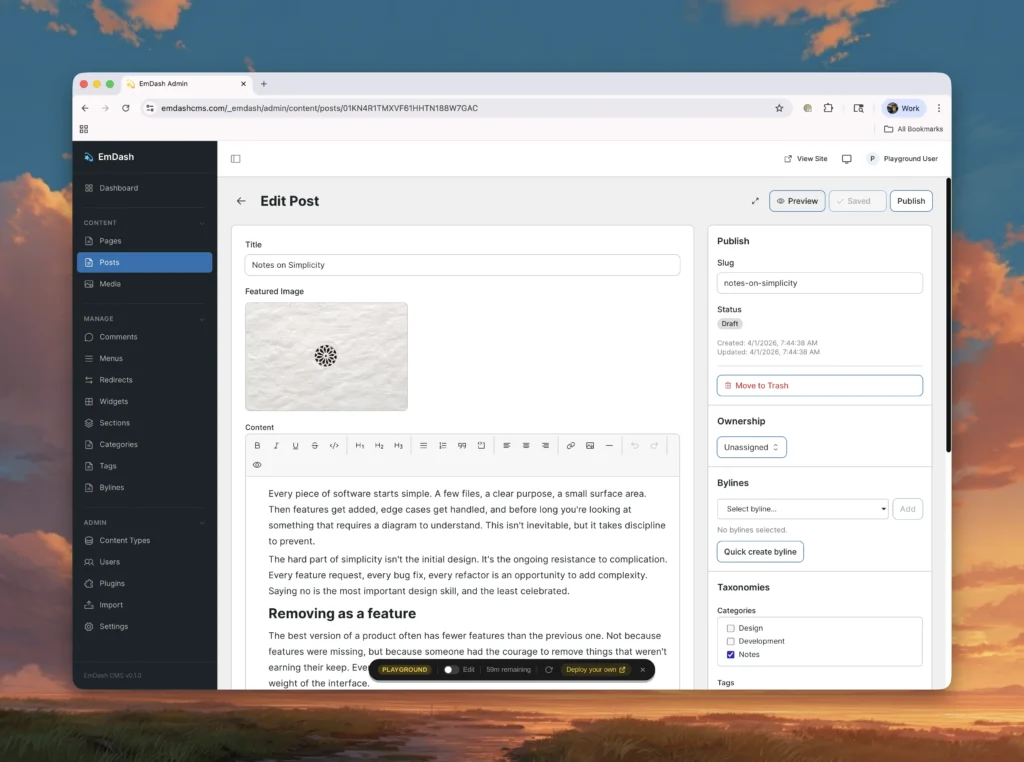
Inside the CMS, users can create pages, posts, and other content types. Instead of writing raw HTML, content is entered in a structured format.
This structured input is then stored in the database and later transformed into a visual output through the rendering system.
Because content is separated from presentation, it can be updated without affecting the underlying design.
This flexibility becomes especially useful when scaling content or adapting it for different use cases.
🧩 Step 7: Customizing the Frontend
While the CMS handles content, the frontend defines how that content is experienced.
Customization happens within the Astro-based theme. Developers can modify components, adjust layouts, and implement new designs.
Since the theme operates independently of the core system, changes can be made without risking system stability.
This separation allows for rapid iteration and experimentation, which is often difficult in tightly coupled systems.
🧩 Step 8: Continuous Updates and Iteration
Once the site is live, the process does not end. Updates can be made to content, themes, and even system logic.
Because deployment is tied to version-controlled workflows, changes can be tested and rolled out incrementally.
This makes EmDash suitable for environments where continuous improvement is required.
🌐 What Happens After Deployment
Once everything is in place, the system operates in a fully automated manner.
When a user visits the site, the request is handled by the nearest edge location. The Worker executes, retrieves data, renders content, and delivers the response — all within milliseconds.
From the user’s perspective, the experience is seamless. Pages load quickly, content appears instantly, and interactions feel smooth.
Behind the scenes, however, a complex orchestration of distributed systems is taking place.
🧠 Developer Experience in EmDash
Working with EmDash requires a slightly different mindset compared to traditional systems.
Instead of thinking in terms of servers and applications, developers think in terms of:
- Functions and execution units
- Data flows
- Rendering pipelines
This shift can take some time to adapt to, but it ultimately leads to a more flexible and scalable development process.
Because everything is modular, developers can focus on individual components without worrying about the entire system at once.
⚡ Performance Characteristics
Performance in EmDash is largely driven by its edge-based execution.
Since content is delivered from locations close to users, latency is reduced significantly.
Additionally, because the system does not rely on long-running processes, it avoids many of the bottlenecks associated with traditional architectures.
The result is a system that is both fast and efficient, capable of handling varying levels of traffic without manual intervention.
🔄 Real-World Workflow
In practice, using EmDash becomes a cycle:
Write Content
   ↓
Store as Structured Data
   ↓
Render via Theme
   ↓
Deliver via Edge
   ↓
Update & Repeat
This cycle continues indefinitely, allowing the system to evolve over time.
At this stage, the picture should feel complete from a practical standpoint. EmDash is no longer just a concept — it is a working system with a defined workflow.
Advanced Capabilities, Limitations, System Impact & Final Understanding
By this point, the structure, workflow, and internal mechanics of EmDash are no longer abstract. What remains is to understand how all of this translates into real-world impact — not just in terms of features, but in how it changes the expectations from a content management system.
Because EmDash is not trying to optimize an existing model. It is attempting to redefine the model itself.
⚡ Beyond Features: What EmDash Is Really Introducing
When systems evolve, the most important changes are not always visible on the surface. In the case of EmDash, the real innovation lies in how responsibilities are redistributed.
Instead of a CMS being a single system that controls everything, EmDash turns it into a coordinator of independent systems.
Execution is separate. Storage is separate. Rendering is separate. Even extensibility is separated through isolation.
This fundamentally changes how failures behave, how scaling works, and how developers think about building applications.
Rather than asking, “How do I manage my server?” the question becomes, “How does each part of my system interact?”
That shift alone is significant.
🔄 The Shift Toward Distributed Thinking
One of the most important ideas introduced by EmDash is that applications no longer need to live in a single place.
With edge execution, your application logic is effectively everywhere. This means that performance is no longer dependent on proximity to a central server, but on how efficiently the system distributes execution.
In practical terms, this leads to:
- Faster response times globally
- Reduced dependency on centralized infrastructure
- More resilience against localized failures
Because requests are handled independently at different edge locations, the system avoids single points of failure that are common in traditional setups.
🧠 Machine-Readable Web and Automation
Another major implication of EmDash’s design is how well it aligns with machine-driven workflows.
Since content is structured and accessible, it can be easily consumed not just by browsers, but by automated systems.
This opens up possibilities where:
- Content can be generated or modified programmatically
- AI systems can interact with content directly
- Workflows can be automated without manual intervention
The CMS becomes less of a manual tool and more of a programmable system.
This is a subtle but powerful shift. It changes the role of the CMS from something you “use” to something you “integrate with.”
🤖 Automation and Agent-Based Interaction
Because EmDash exposes structured data and supports programmatic control, it naturally supports interaction with automated agents.
These agents can:
- Create content
- Update entries
- Trigger workflows
- Respond to events
Instead of logging into a dashboard and making changes manually, actions can be executed through scripts or external systems.
This aligns with a broader trend where software systems are expected to interact with each other autonomously.
💰 Native Support for Value Exchange
The introduction of payment-aware responses adds another dimension to how content is delivered.
By integrating payment logic directly into the response cycle, EmDash enables content to be treated as a resource that can be accessed conditionally.
This is not just about monetization in the traditional sense. It is about enabling systems where access to information can be controlled dynamically based on predefined conditions.
This could be applied in various contexts, from premium content to API-based services.
🔐 Security as a Continuous Property
Earlier, we explored how isolation is implemented. At a higher level, what matters is how this affects the system over time.
In many platforms, security depends heavily on how carefully components are managed. In EmDash, security is built into how components interact.
Because every part of the system operates within defined boundaries, the risk of unintended interactions is reduced.
This does not eliminate the need for secure practices, but it creates a stronger baseline.
Instead of relying on discipline alone, the system enforces constraints that guide safe behavior.
⚙️ Operational Simplicity
Despite its advanced architecture, EmDash simplifies several operational concerns.
There is no need to:
- Maintain servers
- Configure scaling rules manually
- Manage infrastructure at a low level
These responsibilities are handled by the underlying platform.
This allows developers and teams to focus more on building functionality and less on maintaining systems.
However, this simplicity comes with a trade-off — it requires understanding a different model.
📉 Current Limitations and Realities
While EmDash introduces a modern approach, it is still in its early stages.
At the time of its release, it is in a beta phase, which means that:
- Features may evolve
- Tooling may expand
- Documentation may improve over time
Because of this, it is not yet positioned as a fully mature, production-ready solution for all use cases.
There are also practical considerations.
The system requires familiarity with modern development tools and concepts. For those used to traditional workflows, this can introduce a learning curve.
Additionally, because the ecosystem is still developing, the range of available extensions and integrations is limited compared to more established systems.
These factors do not diminish its potential, but they define its current position.
🌐 Real-World Implications of EmDash
When looking at EmDash as a whole, it becomes clear that it is not just a tool for building websites.
It is a framework for building distributed content systems.
This distinction matters.
A website built on EmDash is not just a collection of pages. It is part of a system where content, logic, and delivery are all modular and independently scalable.
This makes it suitable for scenarios where flexibility and scalability are important.
It also aligns with environments where systems need to integrate with each other rather than operate in isolation.
🧭 A Different Way to Think About CMS
Perhaps the most important takeaway from EmDash is not a specific feature, but a shift in perspective.
A CMS is no longer just a place where content is created and published.
It becomes:
- A structured data system
- A programmable interface
- A distributed execution model
This broader definition reflects how the web itself is evolving.
🏁 Final Understanding
When all parts are considered together, EmDash can be understood as a system built on four key ideas:
- Execution should be distributed and on-demand
- Content should be structured and reusable
- Extensibility should be controlled and isolated
- Infrastructure should be abstracted away
Each of these ideas addresses a limitation of older models, but more importantly, they align with how modern systems are expected to behave.
📌 Closing Thoughts
EmDash is a serverless, edge-native content management system developed by Cloudflare, designed to operate on a distributed global network rather than a centralized server.
It separates execution, storage, and rendering into independent layers, using Workers for execution, D1 and R2 for data handling, and Astro for rendering. This modular architecture allows the system to scale automatically, handle requests efficiently at the edge, and maintain stability through isolation.
Its security model is based on controlled environments, where extensions run independently and interact through defined interfaces. This reduces risk while preserving flexibility.
Content is stored in structured formats, enabling reuse, automation, and compatibility with AI-driven systems. Rendering is dynamic, allowing the same content to be presented in multiple ways without modification.
The system supports modern authentication methods, integrates programmatic control, and introduces mechanisms for conditional content access through payment-aware responses.
At the same time, EmDash remains in an early stage, with a developing ecosystem and a learning curve that reflects its modern approach.
Taken together, it represents a shift from traditional content management toward a more distributed, programmable, and machine-compatible model — one that aligns closely with the direction in which the web is evolving.
FAQ
EmDash is an open-source, serverless content management system developed by Cloudflare. It is designed to run on edge infrastructure using Cloudflare Workers, allowing websites to operate without traditional servers while delivering content globally with low latency.
EmDash was officially introduced by Cloudflare in April 2026 as a beta release. It is currently in an early stage, meaning features and capabilities are still evolving based on development and adoption.
EmDash uses a serverless execution model where code runs only when a request is made. Instead of relying on a continuously running server, it executes logic through Cloudflare Workers at the edge, processes the request, and returns a response instantly.
EmDash is built using modern web technologies including TypeScript, Cloudflare Workers for execution, D1 for database storage, R2 for object storage, and Astro for rendering content into user-facing pages.
Content in EmDash is stored in a structured format rather than raw HTML. This allows content to be reused across different platforms, accessed via APIs, and processed more efficiently by automated systems and AI tools.
EmDash uses an isolation-based security model where each extension or plugin runs in a separate environment using V8 isolates. This ensures that no external code can directly access core system resources, reducing the risk of vulnerabilities.
Yes, EmDash can be used to build a complete website. It includes content management capabilities, rendering through Astro, and deployment via Cloudflare’s edge network, allowing sites to be created, customized, and served globally.
Yes, EmDash uses an Astro-based theme system. Developers can create and customize layouts, components, and styles, while keeping the content and system logic separate for better flexibility and security.
EmDash is currently more suitable for developers or users familiar with modern web technologies. Since it involves serverless infrastructure and configuration steps, beginners may face a learning curve during setup and usage.
EmDash represents a shift toward distributed, serverless, and AI-compatible content systems. As it evolves, it has the potential to support advanced automation, scalable applications, and new ways of delivering and monetizing content on the web.
Author
Harshit Kumar
AI SEO Specialist & Founder of kumarharshit.in
With 7+ years of experience, Harshit helps businesses grow through modern SEO strategies, AI-driven search optimization, and future-ready content systems.
Leave a Reply