Yoast SEO AI Full Technical Guide, Setup (How To), Use Cases, Benefits & Best Practices
AI is now baked into almost every step of the SEO workflow. Google is experimenting with AI Overviews, users are asking questions directly inside ChatGPT, Perplexity and Copilot, and content teams are under pressure to publish more while keeping quality high.
Yoast’s answer to this new reality is Yoast SEO AI – a bundle of AI features inside Yoast SEO Premium (and WooCommerce SEO) that helps you write better titles, meta descriptions and on-page content, and summarize posts for both users and AI systems.
This article is a complete Yoast AI review and hands-on guide. It covers:
- What Yoast AI features actually are
- How to enable and configure them
- Step-by-step usage of Yoast AI Generate, Yoast AI Optimize and Yoast AI Summarize
- Real SEO use cases and best practices
- Limitations you should know
- Yoast AI vs Rank Math AI (Content AI) comparison
- FAQs about pricing, sparks, rankings and data
You can copy-paste this as a standalone in-depth article on “Yoast SEO AI” targeting all the related keywords you shared.
Important Clarification About Yoast SEO AI
Yoast SEO AI features are available only in Yoast SEO Premium (and Yoast WooCommerce SEO for product pages). Free users receive only a few test sparks. AI suggestions help improve metadata and on-page optimization but do not guarantee rankings — results still depend on content quality, search intent match, and backlinks.
AI Optimize also has some limits: it works only on supported block types (Paragraph, Heading, List, Table), and only on text sections up to ~1000 words at a time. You must accept or reject full suggestions — partial edits are not supported. Premium users currently have no hard spark cap, but rate limits apply to prevent abuse.
What is Yoast SEO AI?
In simple terms, Yoast SEO AI is a set of AI-powered tools built on top of Yoast SEO Premium that automate some repetitive on-page SEO tasks:
- Yoast AI Generate – generates SEO-friendly titles and meta descriptions for posts, pages, products, categories and tags.
- Yoast AI Optimize – analyses your content and suggests edits to improve keyphrase usage, sentence length and paragraph structure, directly connected to Yoast’s SEO analysis.
- Yoast AI Summarize – a Gutenberg block that creates “Key Takeaways” summaries of your article in a bullet format.
These tools are part of the wider Yoast SEO Premium AI stack – along with redirects, internal linking suggestions, social previews and more.
Unlike generic writing tools that try to write full articles for you, Yoast’s approach is narrower and more SEO-centric: it focuses on titles, metadata, summaries and keyphrase-based optimization, leaving the main content creation in your hands.
Where to Find Yoast AI in WordPress
Once Yoast AI is enabled in Yoast SEO → General → Site features → Yoast AI, you’ll see the features in three places:
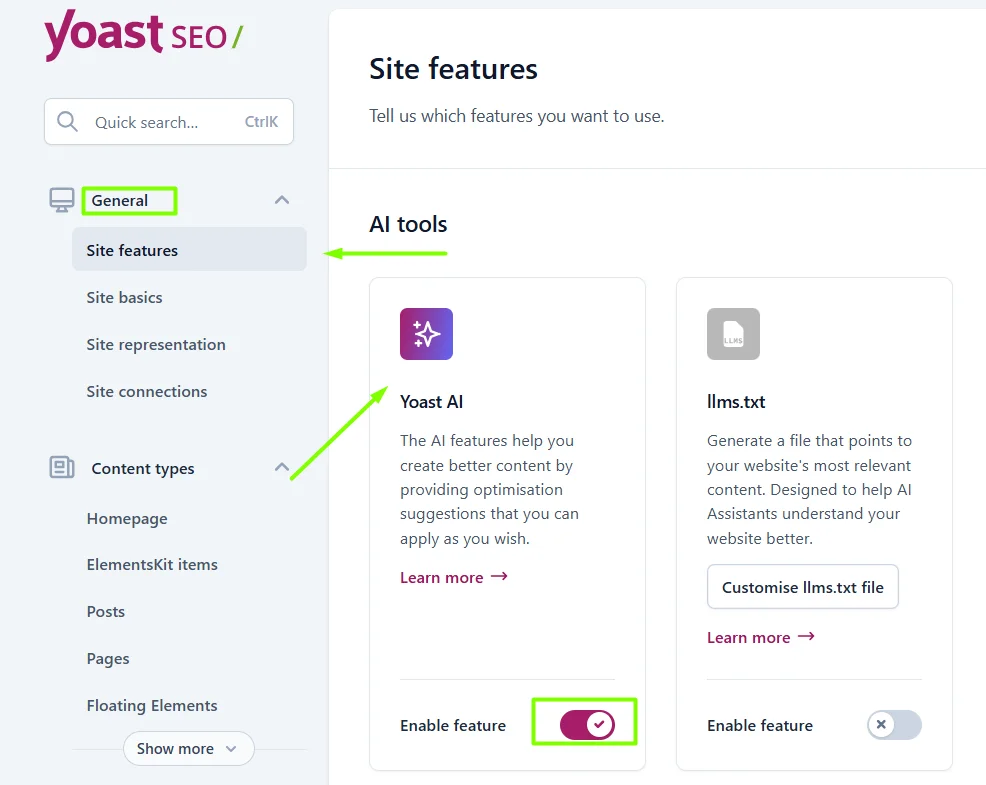
- Yoast AI Generate – inside the Yoast meta box / sidebar, next to SEO title and meta description fields (“Generate with AI”).
- Yoast AI Optimize – inside the Yoast SEO analysis section as an AI optimization button that opens suggestions for improving the content.
- Yoast AI Summarize – as a separate Gutenberg block called Yoast AI Summarize which you can insert anywhere in the post.
There is nothing extra to install beyond Yoast SEO Premium (and WooCommerce SEO if you want AI for products).
How Yoast SEO AI Works (Sparks, Limits & Requirements)
Yoast uses its own AI backend and meters usage using “sparks” – essentially counters for how many AI actions you trigger.
According to the FAQ:
- AI features are exclusive to Yoast SEO Premium and WooCommerce SEO.
- Free users get a small number of sparks to test the feature, and then need to upgrade.
- Premium users currently don’t have a practical spark limit, but Yoast does keep general rate limits to protect their systems.
- You always have full control: you can edit or override any AI suggestion before publishing.
- AI can be used on both new and existing content (posts, pages, products, categories, tags).
From an SEO-safety point of view, Yoast explicitly says that AI output is designed to assist with SEO and readability, but doesn’t guarantee rankings by itself. The quality of suggestions can vary, and you should still treat them as starting points rather than final truth.
Using Yoast AI Generate (Titles & Meta Descriptions)
What Yoast AI Generate Does
Yoast AI Generate is the feature most users touch first. It uses AI to create multiple candidate titles and meta descriptions based on your content and focus keyphrase.
It can generate for:
- Posts & pages
- Categories & tags (posts and products)
- Products (when Yoast WooCommerce SEO is active)
How to Use It
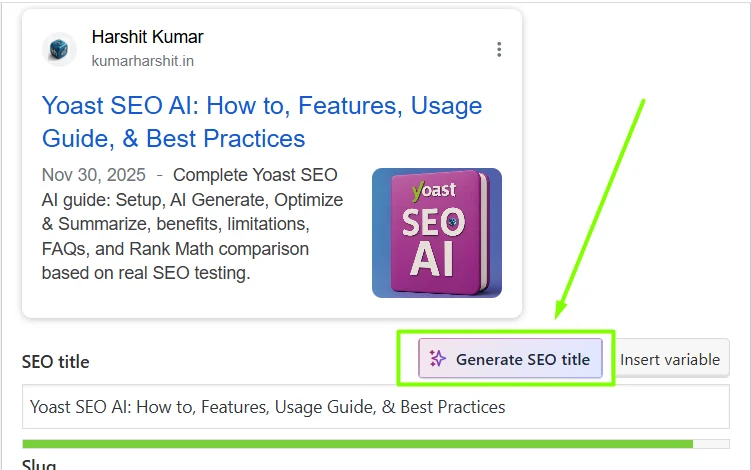
- Open any post, page or category in the WordPress editor.
- Open the Yoast SEO panel (meta box at the bottom or sidebar panel).
- In the SEO title area, click “Generate with AI”.
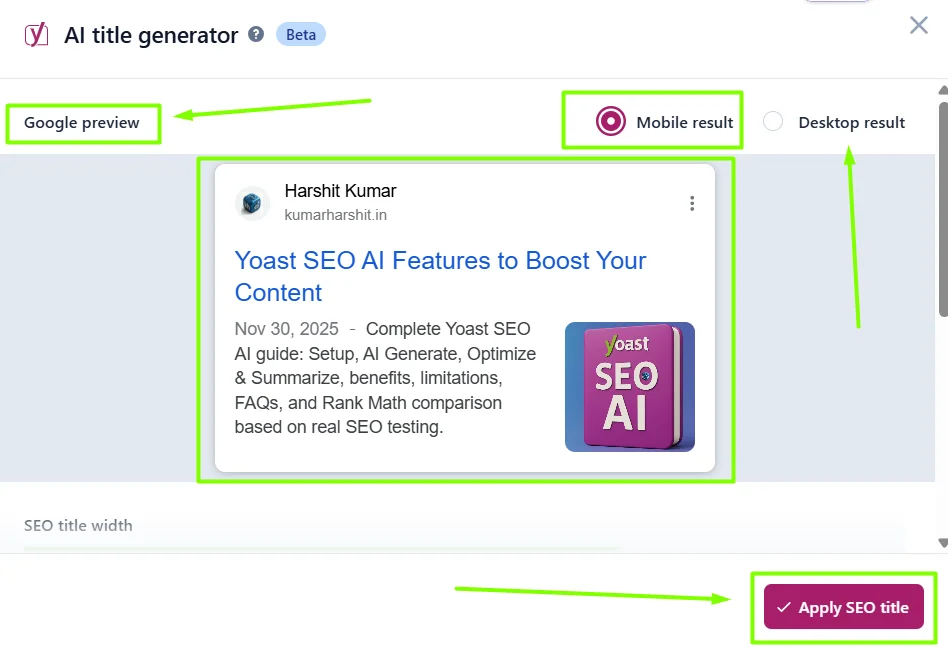
- Yoast will generate several suggested titles. Choose one or click to regenerate more.
- Do the same for the Meta description field.
- Adjust wording manually if needed to fit your brand voice and SERP pixel limits.
Practical Tips for Better Output
To get the best SEO outcome from Yoast AI Generate:
- Always set the focus keyphrase first. Yoast uses it as part of the context.
- Use your own copywriting sense to pick titles that:
- Match search intent
- Highlight a clear benefit or outcome
- Include the keyphrase near the beginning
- Keep meta descriptions informative and action-oriented (not just keyword lists).
- For ecommerce, emphasize product benefits, key specs and any USP (free shipping, warranty, etc.).
Where It Helps Most
- Quickly drafting metadata for large content libraries (blogs with hundreds of posts).
- Cleaning up old posts with weak titles/descriptions.
- Generating ideas when you’re stuck on a headline.
In practice, many SEOs use Yoast AI Generate as a brainstorming assistant rather than a final decision maker: generate 3–5 options, then tweak the best one manually.
Using Yoast AI Optimize (On-Page SEO Improvements)
What Yoast AI Optimize Does
Yoast AI Optimize looks at your content and then proposes concrete edits aimed at passing more of Yoast’s own SEO checks. As of the latest docs, it can optimize:
- Keyphrase in introduction
- Keyphrase density (when underused)
- Keyphrase distribution
- Sentence length
- Paragraph length
It currently works on blocks like Paragraph, Heading, List and Table in the block editor and is generally intended for texts up to about 1000 words at a time.
How to Use It
- Write your post normally and set your focus keyphrase.
- Scroll to the Yoast SEO analysis section. You’ll see some issues in orange/red.
- Click the AI Optimize button (in the analysis box or suggestion popup).
- Yoast generates a proposed version of selected sections, where it:
- Adds the keyphrase in missing places
- Breaks up overly long sentences
- Shortens long paragraphs
- You can either accept the whole suggestion or reject it. At the moment, you cannot accept only part of an AI Optimize suggestion.
Smart Workflow
To keep content human-friendly and not robotic:
- Finish your draft fully first.
- Run normal Yoast SEO analysis and fix obvious issues manually.
- Only then press Yoast AI Optimize for more advanced improvements.
- Check for tone drift: if the suggestion feels too generic or not like your brand voice, reject and adjust manually instead.
Where It’s Especially Useful
- For long posts where you don’t want to manually fix every red bullet.
- For writers who are strong in ideas but weaker in technical on-page SEO.
- For teams where editors want to standardize sentence length and readability.
Using Yoast AI Summarize (Key Takeaways Block)
What Yoast AI Summarize Does
The Yoast AI Summarize block automatically generates a short, scannable summary of your article – usually in bullet form – that explains the main points clearly for readers and AI systems.
The official docs describe it as a way to give “key takeaways” in seconds, helping readers skim faster and giving AI systems clearer signals about what your page is really about.
How to Use It
According to Yoast’s help center:
- In the WordPress editor, click the blue “+” block inserter.
- Search for “Yoast AI Summarize”.
- Insert the block into your post (often near the top or before the conclusion).
- Click “Generate summary”.
- Review and edit the bullet points if required.
- If you don’t like the output, click “Regenerate summary” for a new version.
SEO Impact of Summaries
Summaries like this help in three ways:
- User experience – scanners and mobile readers can understand the value of the article in a few seconds.
- Lower bounce risk – visitors are less likely to leave if they instantly see that the page answers their question.
- AI Overviews and LLMs – clear, well-structured key takeaways make it easier for AI systems to extract the main answer and potentially feature your page when they assemble responses.
For many sites, simply adding a high-quality summary block has visible impact on time on page and engagement metrics.
Real-World Benefits of Yoast SEO AI
From a practical SEO and content workflow perspective, the Yoast AI features mainly deliver value in four areas:
1. Massive Time-Saving on Repetitive Tasks
Titles, descriptions and small on-page tweaks are essential but repetitive. With AI Generate and AI Optimize, Yoast SEO Premium AI helps you do in minutes what would otherwise take hours, especially for big archives or ecommerce catalogs.
2. Stronger On-Page SEO Without Extra Tools
Because Yoast AI is tightly integrated with Yoast’s existing analysis, it nudges you toward:
- Better keyphrase placement
- More readable sentences
- Cleaner paragraph structure
- Clearer metadata
You don’t have to jump between external AI tools and your editor.
3. Better Prepared for AI Search & Overviews
AI Overviews and LLM-based answers depend heavily on clear, structured, well-summarized content. AI Summarize plus a well-optimized title/description combo gives search engines and AI systems richer, more explicit signals about the intent and value of your page.
Combine that with llms.txt (the other AI-related feature in Yoast) and your site is significantly more “AI-ready”.
4. Easier Content Updating & Refreshing
Many SEOs use Yoast AI when refreshing old posts:
- Run AI Generate for a more modern, CTR-optimized title
- Use AI Optimize to fix weak keyphrase usage
- Add an AI Summarize block to communicate key takeaways
This pattern is especially effective for content that’s already ranking on page 2 or low page 1 and just needs a nudge.
Limitations & Things to Watch Out For
No AI tool is perfect. Before you rely heavily on Yoast SEO AI, be aware of these limitations:
- Premium-only: all Yoast AI features are behind the Yoast SEO Premium / WooCommerce SEO paywall.
- Word count and block limits: AI Optimize works on selected blocks and shorter chunks of text (around 1000 words). You may need to run it section by section on very long posts.
- All-or-nothing suggestions: for AI Optimize, you currently can’t accept only one sentence of a suggestion – you must accept or reject the whole batch.
- Generic tone risk: like any AI, suggestions can sound generic if you copy them blindly. Always customize to your brand voice.
- On-page only: Yoast AI helps with on-page content and metadata, not with backlinks, technical infrastructure outside WordPress or content strategy.
Treat Yoast AI as a smart assistant, not a replacement for strategic SEO thinking.
Yoast AI vs Rank Math AI (Content AI)
A lot of users search for “yoast ai vs rank math ai” when deciding which SEO plugin ecosystem to invest in. Here’s a neutral, side-by-side perspective based on official documentation.
Yoast SEO AI (Yoast SEO Premium)
- Focus: AI support for titles, meta descriptions, summaries and keyphrase-driven on-page improvements.
- Where it lives: Inside Yoast SEO Premium (WordPress.org plugin) and Yoast WooCommerce SEO – no separate AI plugin needed.
- Charging model: Uses sparks and rate limits, but currently no hard cap for paying users.
- Depth: Very integrated into Yoast’s existing SEO analysis and traffic-light system.
Rank Math Content AI
Rank Math’s Content AI is a broader AI layer:
- Focus: Full content creation assistant – long-form writing, meta tags, FAQs, outlines, image alt text, SEO descriptions, etc.
- Tools: 40+ AI tools, RankBot chat, bulk meta title/description generation, image ALT text, AI-fixed SEO tests, etc.
- Charging model: Separate credits-based plans (Content AI plan) layered on top of Rank Math SEO.
- Depth: Strong for long-form content generation and advanced AI prompts; more of an “AI writing suite”.
Which One to Choose?
- If you already use Yoast SEO Premium, want AI that is focused on metadata + on-page tweaks, and you prefer a lighter, less overwhelming AI layer, Yoast SEO AI makes more sense.
- If you want a full AI writing workstation inside WordPress and are comfortable managing credits, prompts and more complex workflows, Rank Math Content AI is more feature-rich.
In short: Yoast SEO AI is narrower but cleaner and deeply aligned with Yoast’s analysis.
Rank Math AI is broader and more aggressive for content generation but also more complex.
Best Practices for Getting the Most from Yoast SEO AI
To squeeze maximum value out of yoast seo premium ai features, use them inside a consistent workflow:
- Do your keyword research first.
Set focus keyphrases in Yoast and know what search intent you target before generating titles or summaries. - Write the article yourself or with your own AI workflow.
Don’t rely on Yoast AI to write full posts – that’s not its design. Use it to refine, not to replace. - Generate multiple title & description variants.
Use Yoast AI Generate for ideas, then pick and polish the option that best matches your brand voice and SERP competition. - Run AI Optimize late in the process.
After the draft is complete and basic issues are fixed, run yoast ai optimize as a final refinement step. - Always edit summaries.
The default yoast ai summarize output is a very good starting point, but a quick manual edit can make the bullets sharper and more conversion-oriented. - Track performance.
Make note of posts where you changed titles/descriptions using Yoast AI and monitor CTR and rankings over a few weeks. - Combine with llms.txt and technical SEO.
Yoast SEO also has llms.txt and strong schema support. Using AI summaries plus llms.txt guidelines can help LLMs understand and surface your content more reliably.
Who Should Use Yoast SEO AI?
Yoast SEO AI is especially valuable for:
- Bloggers and content creators who publish often and want to save time on metadata and fine-tuning.
- In-house marketing teams who need non-technical writers to follow consistent SEO best practices.
- Agencies managing many sites and needing quick metadata cleanup before audits or relaunches.
- Ecommerce owners using Yoast WooCommerce SEO who want AI-generated product titles and descriptions at scale.
If you rarely publish content, the gains are smaller. But for any site with dozens or hundreds of URLs, the time savings add up fast.
FAQs
No. The AI features are exclusive to Yoast SEO Premium and Yoast WooCommerce SEO, though free users get a few test sparks.
Not directly. Yoast clearly states that AI suggestions are designed to improve keyphrase usage, clarity and click-through potential, which can support better rankings, but Google still looks at content quality, backlinks, intent match and many other factors.
Yes. For AI Generate and AI Summarize, you can freely edit anything after insertion. For AI Optimize, you accept or reject the full suggestion, but can then manually tweak the edited text.
Yes. You can open any old post, page, product, category or tag and use yoast ai generate, yoast ai optimize or yoast ai summarize on it.
Yoast uses a spark counter and general rate limits. For Premium users there is currently no strict cap on sparks, but free users are limited. Yoast may adjust these policies over time.
Yoast says its AI features are tailored toward your site and focused on giving suggestions; the documentation does not indicate that your content is shared with public third-party models like OpenAI for training. For exact legal details you should always check Yoast’s latest privacy and data-processing terms.
Final Verdict – Is Yoast SEO AI Worth Using?
As a yoast ai review, here’s the honest summary:
- Strengths
- Deep integration with existing Yoast SEO analysis and workflows
- Very easy to use for non-technical writers
- Excellent for titles, descriptions, summaries and keyphrase-based fine-tuning
- No extra external dashboards or accounts needed when you already use Yoast SEO Premium
- Weaknesses
- Limited scope compared with full AI writing suites like Rank Math Content AI
- AI Optimize is still evolving and can feel rigid (all-or-nothing acceptance, block limits)
- Premium required; free users get only small test usage
If your main SEO stack is already built around Yoast SEO Premium, turning on Yoast SEO AI is almost a no-brainer. It saves time, improves on-page SEO quality and helps you prepare content for both traditional search and AI-driven experiences.
For creators who want a full AI writing factory inside WordPress, Rank Math AI remains a strong alternative – but for most WordPress sites that simply want smarter metadata, cleaner content and better summaries, Yoast SEO AI is a practical, focused and powerful upgrade.
Author
Harshit Kumar is an Indian AI SEO Specialist and founder of KumarHarshit.in. With 7+ years of hands-on experience, he is known for his practical SEO and tool experiments, smart ranking techniques, and deep research on AI-driven search trends. Harshit helps bloggers, startups, and businesses scale organic traffic through data-backed & experience-based SEO strategies — not theory. He is also the creator of multiple free WordPress plugins and seo tools for publishers.
Good post! We will be linking to this particularly great post on our site. Keep up the great writing
I just like the helpful information you provide in your articles
This was beautiful Admin. Thank you for your reflections.
I really like reading through a post that can make men and women think. Also, thank you for allowing me to comment!