Google Search Console Adds Social Channel Insights — 8 December 2025 Update
Google has announced a major new expansion inside Search Console Insights, enabling website owners to analyze traffic coming from their linked social channels — not just their website.
This update gives a unified view of performance across both Search and social, making it easier for publishers, creators, brands, and businesses to understand content distribution across platforms. (Source)
Until now, Search Console Insights showed performance only from website content. With this update, Google now integrates social channel analytics directly inside GSC, displaying how content from your social channels performs in Google Search.
🔍 What exactly are “Social Channels” inside Search Console?
According to Google’s announcement, social channels refer to:
✔ Public social profiles linked with your website
✔ Platforms where your brand publishes content regularly
✔ Channels Google has automatically identified and connected to your property
Examples include YouTube channels and other social platforms when properly associated with GSC.
⭐ What new insights are now available?
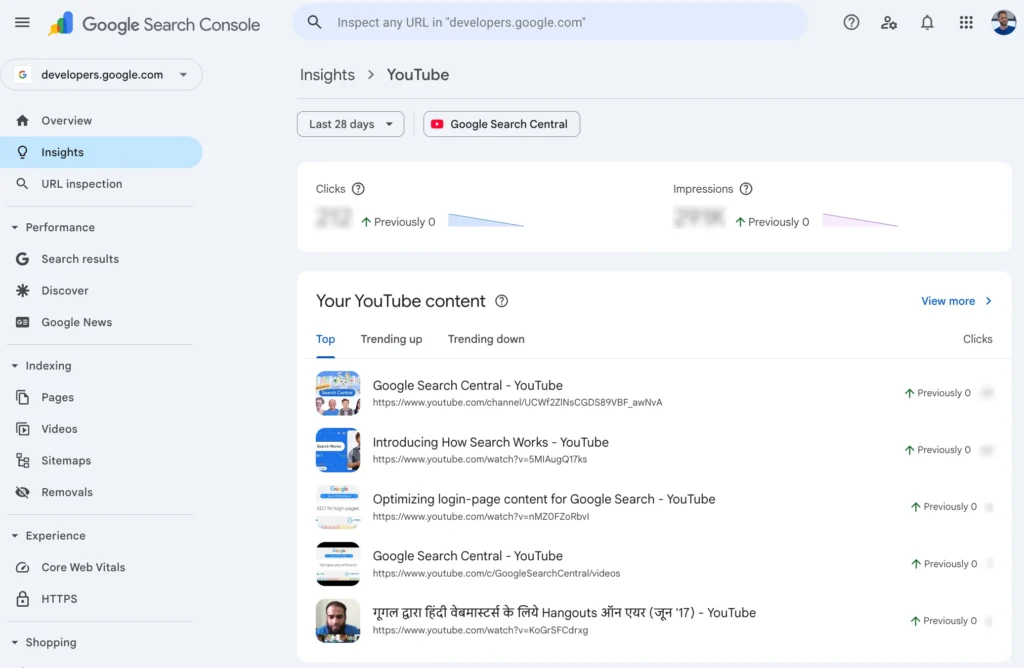
The new Social Channels section in Search Console provides:
| Insight Type | Description |
|---|---|
| Total reach | Clicks + impressions Google Search is driving to your social channel |
| Content performance | Top performing social posts, including trending up/down |
| Search queries | Keywords driving users to your social profiles or social posts |
| Audience location | Top countries where users are clicking your social channel in Google Search |
| Additional traffic sources | Image Search, News Search, Video Search & more |
In short, you can now view how your content on YouTube and other social channels attracts Search traffic, not only how your website does.
🛠 How to access Social Channel Insights in Search Console
If this experiment is enabled for your property:
- Go to Search Console
- Navigate to Search Console Insights
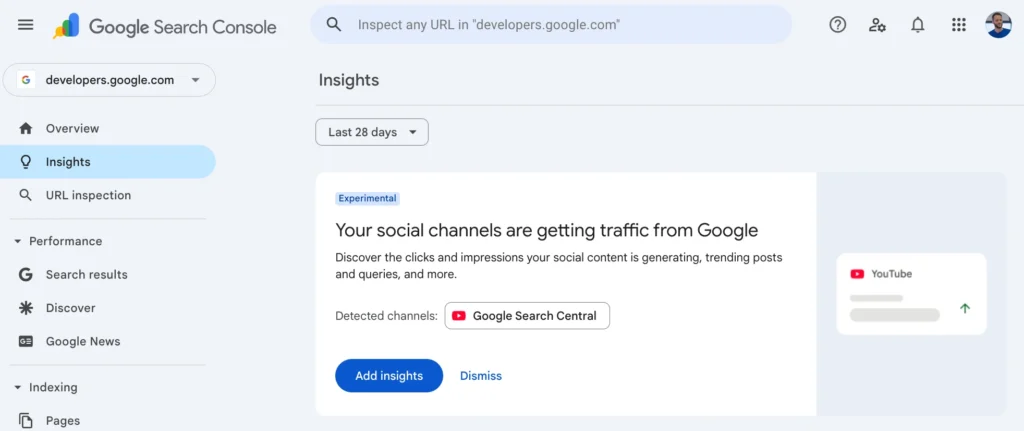
- Look for a card showing your social channels
- Click view more to open the full breakdown
If Google has auto-detected your social channel, you will see a card showing:
“Your social channels are getting traffic from Google”
If not, you may see a prompt to add / verify the social channel manually.
🎯 Why this matters for SEO, brands & publishers
Google has essentially connected website analytics + social analytics + Search analytics in one place, which helps you:
| Benefit | Why it matters |
|---|---|
| Identify content that works across search + social | Improves content planning |
| See real traffic impact of YouTube/social post shares | Helps optimize distribution strategy |
| Understand who finds you first via social/Search | Supports audience targeting |
| Track trending posts and queries | Real advantage for topical content |
This is a big deal for SEO + content marketing, because it finally shows how social content contributes to brand discovery in Search.
🌍 Rollout & Availability
Google stated clearly:
🔹 The Social Channel Insights feature is experimental
🔹 It is being rolled out to a limited set of websites first
🔹 Over time, it may expand to more properties
If you don’t see this feature yet, it simply means your site is not included in the initial rollout.
💡 Short Summary
- Google now tracks performance of your social channels inside Search Console
- View clicks, impressions, queries, trending posts & audience locations for YouTube/social channels
- Feature is experimental, not available for all sites yet
- Helps SEOs measure search + social content success together
- Valuable for publishers, brands, creators, marketers & businesses
FAQ
No. It is currently enabled only for selected sites as part of an experiment.
Any social channel Google has successfully detected and linked to your website (e.g., YouTube).
No. It adds social analytics on top of the existing website analytics.
In some cases yes — Google may prompt you to link your social channel if not auto-detected.
No. This feature is reporting-based only. It does not affect search rankings or SEO signals.
Author
Harshit Kumar — AI SEO Specialist & founder of KumarHarshit.in, known for practical SEO experiments and deep analysis of Google’s latest updates.

Leave a Reply