EmDash vs WordPress: Complete Comparison of Architecture, Performance, Scalability & Future of CMS
Understanding Two Completely Different CMS Philosophies
At first glance, comparing EmDash and WordPress may seem straightforward — both are content management systems designed to help users create and manage websites.
But the reality is very different.
This is not a comparison between two similar tools. It is a comparison between two completely different eras of the web.
WordPress represents a model that was built for a server-centric internet. EmDash represents a model built for a distributed, serverless, edge-first web.
So before comparing features, performance, or usability, it is critical to understand that these platforms are solving the same problem — but in fundamentally different ways.
🧠 Two Different Philosophies of the Web
To truly understand the difference, you need to look at the philosophy behind each system.
WordPress was created in a time when:
- Websites lived on servers
- Applications were monolithic
- Content and presentation were tightly coupled
- Extensibility meant adding plugins directly into the system
That model worked extremely well — and still does in many cases.
But the web has evolved.
Today, systems are expected to:
- Scale automatically
- Operate globally
- Integrate with APIs and AI
- Handle traffic without manual infrastructure management
This is where EmDash enters.
It is built with the assumption that:
- Execution should be distributed
- Systems should be modular
- Content should be structured
- Security should be enforced by design
This philosophical difference drives everything that follows.
🏗️ Architecture: Monolithic vs Distributed
The most important difference between EmDash and WordPress lies in their architecture.
WordPress follows a monolithic model. This means that:
- The application runs on a server
- The database is tightly connected
- Themes and plugins operate within the same environment
- Most components share access to the same resources
In this setup, everything is interconnected. While this makes development easier initially, it can create complexity as the system grows.
EmDash, on the other hand, follows a distributed architecture.
Instead of running as a single application, it is composed of multiple independent components:
- Execution happens in Workers
- Data is stored separately
- Rendering is handled independently
- Extensions run in isolated environments
This separation changes how the system behaves under load, how failures occur, and how security is enforced.
⚙️ Execution Model: Always-On vs On-Demand
Another critical difference lies in how each system executes code.
WordPress relies on a traditional execution model where:
- A server is always running
- Requests are processed by that server
- Resources are continuously allocated
Even when there is no traffic, the server remains active.
EmDash uses an on-demand execution model.
- Code runs only when a request is made
- Each request triggers a fresh execution
- No persistent server is required
This leads to a system where resource usage is directly tied to actual activity.
The implications of this difference become more apparent when considering scalability and cost, which we will explore later.
🌐 Content Delivery Approach
In WordPress, content delivery is typically tied to the server where the site is hosted.
Even when using caching or CDNs, the core logic still originates from a central location.
This creates a dependency on infrastructure setup and optimization.
EmDash changes this by delivering content from the edge.
When a user makes a request:
- The request is handled at the nearest location
- Processing happens close to the user
- Response time is reduced significantly
This is not an add-on feature — it is built into how the system operates.
🧱 System Structure: Coupled vs Decoupled
WordPress is a tightly coupled system.
Content, logic, and presentation are deeply connected. Themes directly influence how content is stored and rendered. Plugins can interact with almost every part of the system.
This makes customization easy, but also increases complexity and risk.
EmDash takes a decoupled approach.
- Content is separate from presentation
- Execution is separate from storage
- Extensions operate independently
Each part of the system has a clearly defined role.
This reduces unintended interactions and makes the system more predictable.
🔐 Security Philosophy: Trust vs Isolation
Security is one of the most defining differences between the two systems.
WordPress operates on a trust-based model.
Plugins and themes are allowed to run within the same environment as the core system. They can access the database, modify files, and interact with other components.
While this enables flexibility, it also creates potential risks.
EmDash operates on an isolation-based model.
Each extension runs in its own environment, with limited access to system resources. Communication happens through controlled interfaces rather than direct access.
This shifts security from being a matter of careful management to being a built-in property of the system.
🧠 Content Model: HTML vs Structured Data
In WordPress, content is primarily stored as HTML.
This means that content and presentation are often intertwined. While this works well for traditional websites, it can limit flexibility when content needs to be reused or adapted.
EmDash uses structured content.
Content is stored as data, separate from how it is displayed. This allows it to be:
- Rendered in different formats
- Accessed through APIs
- Processed by external systems
This difference becomes especially important in environments where content needs to be distributed across multiple platforms.
🔄 Flexibility vs Control
WordPress offers flexibility through openness.
Developers can modify almost any part of the system, create custom plugins, and extend functionality without strict boundaries.
EmDash offers flexibility through structure.
Instead of allowing unrestricted access, it provides defined ways to extend the system. This ensures that flexibility does not compromise stability or security.
Both approaches have their advantages, but they represent different priorities.
⚡ Performance Foundations
Performance in WordPress depends heavily on:
- Hosting quality
- Caching strategies
- Optimization techniques
With the right setup, it can perform extremely well, but it requires effort.
EmDash is designed with performance as a default outcome.
Because execution happens at the edge and resources are allocated dynamically, the system naturally delivers fast responses without requiring extensive optimization.
🧭 Early Observation
At this stage, one thing should be clear:
This is not just a comparison of features — it is a comparison of approaches to building and managing web systems.
WordPress focuses on accessibility, flexibility, and a proven model.
EmDash focuses on modern architecture, controlled environments, and future-ready systems.
Plugins, Themes, Developer Experience & Real Workflow Differences
As we move beyond architecture and philosophy, the comparison becomes more practical. This is where the differences begin to directly affect how developers, marketers, and businesses actually use these systems on a daily basis.
Because at the end of the day, a CMS is not judged only by how it is built — but by how it behaves when people interact with it.
🔌 Extensibility: Plugins vs Isolated Systems
One of the most defining aspects of any CMS is how it can be extended.
In WordPress, extensibility is built around plugins. These plugins integrate directly into the core system and can modify almost any part of its behavior. They can access the database, change how content is processed, and interact with themes and other plugins.
This level of access makes WordPress extremely flexible. Almost any feature can be added with the right plugin.
However, this flexibility comes with trade-offs.
Because plugins operate within the same environment as the core system, they share resources and permissions. If one plugin introduces a vulnerability or behaves unexpectedly, it can affect the entire system.
Over time, as more plugins are added, the complexity increases. Managing compatibility, updates, and interactions becomes a significant part of maintaining a WordPress site.
In EmDash, extensibility follows a very different model.
Instead of plugins running inside the core system, each extension operates in its own isolated environment. These environments are separate execution units, meaning they do not share memory or direct access to system resources.
Interaction between the core system and extensions happens through defined interfaces rather than unrestricted access.
This changes how extensibility works at a fundamental level.
Instead of thinking, “What can this plugin modify?”, the question becomes, “What is this extension allowed to do?”
The result is a system where extensions are powerful but controlled.
🔐 Real Impact of This Difference
This difference in extensibility has several real-world implications.
In WordPress, adding functionality is often quick and straightforward. But as the number of plugins grows, the system can become harder to manage. Conflicts between plugins, performance issues, and security risks can emerge over time.
In EmDash, adding functionality may require more deliberate setup, but the system remains stable because each extension operates independently.
This creates a trade-off between ease of use and long-term reliability.
🎨 Theme Systems: Template-Based vs Component-Based
Themes define how a website looks and feels, and the approach taken by each system reflects its underlying philosophy.
In WordPress, themes are deeply integrated with the system. They control layout, styling, and often influence how content is structured and displayed. Themes can also include custom logic, making them highly customizable.
However, because themes have access to core functions and data, they can also introduce complexity and potential risks.
In EmDash, themes are built using a component-based approach with Astro.
Instead of being tightly coupled with the system, themes receive structured content and render it into a visual format. They do not directly access the database or core logic.
This separation creates a cleaner boundary between design and functionality.
Developers focus on how content is presented, while the system handles how content is managed and retrieved.
🧠 Developer Experience: Familiar vs Modern
The experience of working with each system can feel very different depending on the developer’s background.
WordPress offers a familiar environment for those who have worked with PHP-based systems. Its ecosystem, documentation, and community support make it accessible and widely adopted.
Development often involves:
- Modifying themes
- Installing plugins
- Writing PHP functions
- Managing server configurations
This approach is well-established and supported by a vast ecosystem.
EmDash, on the other hand, is designed for a modern development workflow.
It involves:
- Working with TypeScript
- Understanding serverless execution
- Managing distributed components
- Using modern frameworks like Astro
This requires a different skill set, but it also aligns with current trends in web development.
Instead of focusing on server management, developers focus on data flow, execution logic, and rendering pipelines.
🔄 Workflow Differences in Practice
To understand how these systems differ in real usage, it helps to look at the workflow.
In WordPress, the typical workflow involves:
- Setting up hosting
- Installing the CMS
- Choosing a theme
- Adding plugins
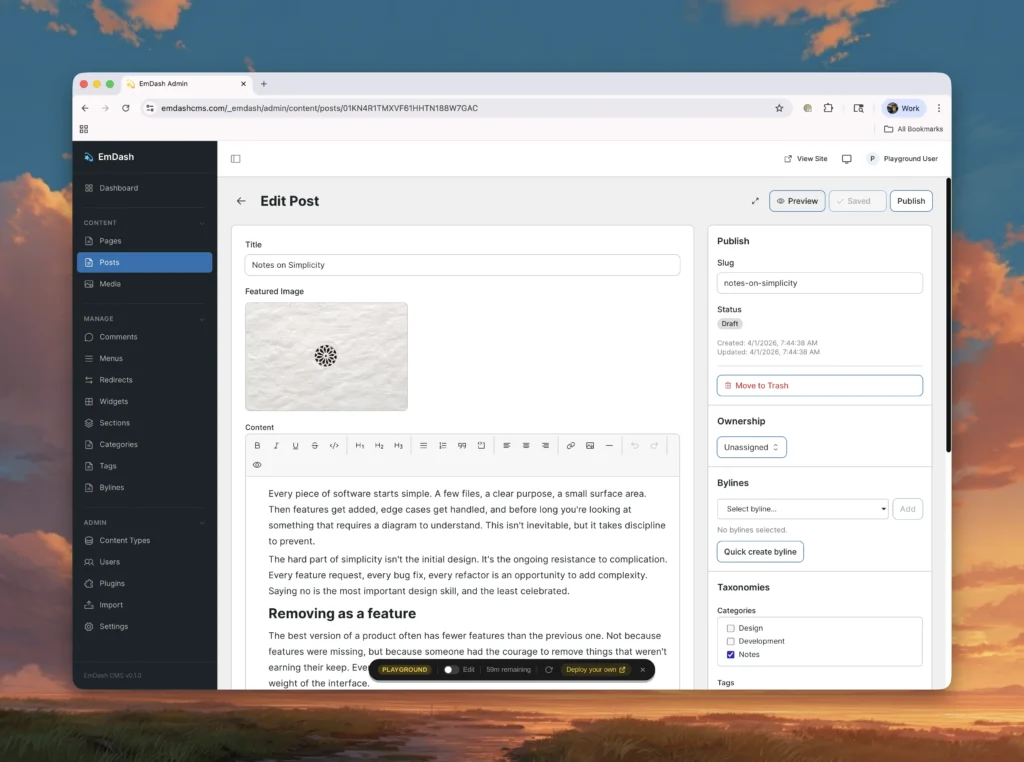
- Creating content through the dashboard
Most actions are performed through a graphical interface, making it accessible to non-technical users.
In EmDash, the workflow is more structured and development-oriented.
- The environment is prepared
- The system is configured
- Deployment is handled through commands
- Content is created within a structured system
- The frontend is customized separately
This workflow emphasizes control and modularity over simplicity.
⚙️ Maintenance and Updates
Maintenance is another area where differences become apparent.
In WordPress, updates are frequent and often involve:
- Core updates
- Plugin updates
- Theme updates
Each update can introduce compatibility considerations, requiring careful management.
In EmDash, the modular nature of the system reduces interdependencies.
Because components are isolated, updates to one part are less likely to affect others. This leads to a more predictable update process.
However, since the system is still evolving, updates may involve changes to the underlying architecture or workflows.
⚡ Performance in Real Usage
Performance in WordPress depends on multiple factors.
A well-optimized WordPress site can perform very well, but achieving that performance often requires:
- Caching solutions
- CDN integration
- Database optimization
- Plugin management
Without these optimizations, performance can degrade as the site grows.
In EmDash, performance is built into the system.
Because execution happens at the edge and resources are allocated dynamically, the system naturally delivers fast responses.
There is less reliance on external optimization techniques because the architecture itself is optimized.
🧩 Flexibility vs Predictability
At this stage, a clear pattern emerges.
WordPress offers flexibility through openness. Developers can modify almost anything, which allows for rapid customization but can introduce unpredictability.
EmDash offers predictability through structure. By defining boundaries and enforcing isolation, it creates a system that behaves consistently.
Both approaches have value, but they serve different priorities.
🧭 Where the Real Difference Lies
The deeper you go into this comparison, the clearer it becomes that the difference is not about which system is better in absolute terms.
It is about how each system approaches the problem of managing content.
WordPress focuses on accessibility and adaptability.
EmDash focuses on structure and control.
This distinction shapes everything from development workflows to long-term scalability.
Scalability, Cost, Performance & Real-World Behavior
As we move further into this comparison, the focus shifts from how these systems are built to how they behave under pressure.
Because architecture and features only matter when they translate into real-world outcomes — speed, cost, scalability, and reliability.
This is where the gap between EmDash and WordPress becomes much more visible.
🌐 Scalability: Vertical vs Distributed Growth
Scalability is one of the most important factors for any website, especially when traffic starts growing.
In a traditional setup like WordPress, scalability is typically handled through infrastructure upgrades.
As traffic increases, you need to:
- Upgrade your hosting plan
- Add more server resources
- Configure load balancers
- Optimize database performance
This approach is often referred to as vertical scaling (increasing the power of a single system) or manually managed horizontal scaling.
While effective, it requires planning and ongoing management.
EmDash approaches scalability differently.
Because it runs on a distributed edge network, scaling is not something you manually configure.
Instead:
- Each request is handled independently
- Execution automatically expands across locations
- No single server becomes a bottleneck
This is inherent horizontal scaling, where the system grows automatically with demand.
There is no concept of “upgrading your server” — the system adjusts itself.
⚡ Performance Under Load
Performance is not just about speed in normal conditions — it is about how the system behaves when traffic spikes.
In WordPress, performance under load depends heavily on setup.
Without optimization:
- Server response time increases
- Database queries slow down
- Pages take longer to load
With proper optimization (caching, CDN, etc.), performance can improve significantly — but it requires effort and monitoring.
In EmDash, performance is closely tied to its execution model.
Since each request is processed independently at the edge:
- There is no shared bottleneck
- Load is distributed automatically
- Response time remains consistent
This makes the system more resilient to sudden traffic spikes.
💰 Cost Model: Fixed vs Usage-Based
Cost is another area where the difference becomes very clear.
WordPress typically follows a fixed cost model.
You pay for:
- Hosting (monthly/yearly)
- Premium themes/plugins
- Maintenance tools
Even if your site has low traffic, you still pay for the server being active.
As traffic grows, costs increase due to higher hosting requirements.
EmDash follows a usage-based model.
- You pay based on actual execution
- No cost when there are no requests
- Costs scale with usage
This creates a system where:
- Small sites can operate with minimal cost
- High-traffic sites pay proportionally
It aligns cost directly with activity.
📊 Direct Comparison Table
Now let’s put this into a clear side-by-side view:
Aspect              | WordPress                          | EmDash
--------------------|------------------------------------|-------------------------------
Scalability         | Manual (server upgrades required)  | Automatic (edge scaling)
Execution Model     | Always-on server                   | On-demand execution
Performance Control | Requires optimization              | Built into architecture
Traffic Handling    | Limited by server capacity         | Distributed across network
Cost Structure      | Fixed + scaling costs              | Usage-based (pay per request)
Downtime Risk       | Possible (server overload)         | Minimal (distributed system)
Global Speed        | Depends on CDN setup               | Native edge delivery
📈 Visual Comparison Graph (Conceptual)
Here’s a simple conceptual graph to understand behavior under traffic:
Traffic Load  → → → → → → →WordPress Performance:
██████████▇▇▇▇▆▆▅▅▄▄
(Drops as load increases without scaling)EmDash Performance:
████████████████████
(Stable due to distributed execution)
🔐 Security Under Scale
As traffic increases, so does the attack surface.
In WordPress:
- More plugins = more potential vulnerabilities
- Increased traffic = higher risk of exploitation
- Security depends on updates and monitoring
Scaling a WordPress site often means scaling its security management as well.
In EmDash:
- Isolation reduces shared risk
- Each execution is independent
- No centralized attack point
This creates a system where scaling does not proportionally increase risk in the same way.
🧠 Infrastructure Responsibility
Another major difference is who is responsible for infrastructure.
In WordPress:
- You (or your hosting provider) manage infrastructure
- Performance tuning is your responsibility
- Scaling decisions are manual
In EmDash:
- Infrastructure is abstracted
- Scaling is automatic
- System behavior is predefined
This reduces operational overhead significantly.
⚙️ Real-World Scenario: Traffic Spike
Let’s consider a practical situation.
A blog post suddenly goes viral and receives a massive spike in traffic.
In WordPress:
- Server load increases
- Pages may slow down
- Site may crash if limits are exceeded
- Immediate action may be required
In EmDash:
- Requests are distributed across the edge
- No single point gets overloaded
- Performance remains stable
- No manual intervention needed
🔄 Long-Term Growth Behavior
Over time, as a website grows, the differences compound.
WordPress:
- Requires ongoing optimization
- Infrastructure becomes more complex
- Maintenance effort increases
EmDash:
- Growth is absorbed by the system
- Complexity remains relatively stable
- Maintenance is reduced at the infrastructure level
🧭 What This Means Practically
At this stage, the comparison becomes less about features and more about outcomes.
WordPress gives you control — but with responsibility.
EmDash gives you automation — but with structure.
The choice between them often depends on whether you prefer managing systems or relying on systems designed to manage themselves.
Use Cases, Strengths, Limitations & Final Verdict
By now, the architectural, technical, and operational differences between EmDash and WordPress are clear. What remains is the most important question:
Where should each of these systems actually be used?
Because no system exists in isolation. The real value comes from choosing the right tool for the right situation.
🧩 Understanding Real-World Use Cases
Instead of asking which platform is “better,” it is more useful to ask:
- What type of website are you building?
- What level of control do you need?
- How much technical complexity can you handle?
- What are your long-term goals?
These questions determine which system fits better.
🌐 When WordPress Makes More Sense
WordPress excels in environments where simplicity, speed of setup, and ecosystem support are important.
It works particularly well when:
- You need to launch a website quickly
- You rely on ready-made themes and plugins
- You prefer a visual interface over code
- You want access to a large community and support system
In these scenarios, WordPress provides a level of convenience that is difficult to match.
It allows users to focus on content and business rather than infrastructure.
⚙️ When EmDash Makes More Sense
EmDash is better suited for scenarios where modern architecture, scalability, and control are priorities.
It becomes relevant when:
- You want a system built on serverless infrastructure
- You need automatic scaling without manual intervention
- You are building for long-term performance and flexibility
- You want structured content for multi-platform use
- You are comfortable working with modern development workflows
In these cases, EmDash offers advantages that are not easily achievable with traditional systems.
🧠 Skill Requirement Difference
One of the most practical differences between the two systems is the level of expertise required.
WordPress lowers the barrier to entry.
- Non-technical users can create and manage websites
- Most tasks can be done through a dashboard
- Minimal coding knowledge is required
This accessibility is one of the reasons for its widespread adoption.
EmDash, on the other hand, assumes a different level of familiarity.
- Understanding of modern web technologies is expected
- Deployment involves command-based workflows
- Customization requires development knowledge
This does not make it inaccessible, but it does mean that it is not designed as a beginner-first system.
⚖️ Strengths and Limitations
At this stage, it becomes useful to clearly outline strengths and limitations.
Category        | WordPress Strengths                  | EmDash Strengths
----------------|--------------------------------------|------------------------------
Ease of Use     | Beginner-friendly                    | Structured & predictable
Ecosystem       | Massive plugin/theme library         | Controlled, secure extensions
Flexibility     | Highly customizable                  | Modular & scalable
Performance     | Good with optimization               | High by design
Scalability     | Requires management                  | Automatic
Security        | Depends on management                | Built-in isolation
Now looking at limitations:
Category        | WordPress Limitations                | EmDash Limitations
----------------|--------------------------------------|------------------------------
Complexity      | Increases with plugins               | Requires technical knowledge
Maintenance     | Ongoing updates needed               | Still evolving system
Scalability     | Manual effort required               | Less mature ecosystem
Control         | Can become unpredictable             | More restrictive structure
📊 Decision Flow (Simple Logic)
Here’s a simplified way to think about the decision:
Need quick, easy website?
        ↓
     WordPressNeed scalable, modern architecture?
        ↓
      EmDashPrefer visual setup & plugins?
        ↓
     WordPressPrefer structured, controlled system?
        ↓
      EmDash
🔄 Long-Term Perspective
The most important difference between EmDash and WordPress is not what they are today — but what they are designed for.
WordPress is optimized for accessibility and immediate usability.
EmDash is optimized for long-term architectural alignment with modern systems.
This creates a situation where:
- WordPress solves today’s problems efficiently
- EmDash prepares for tomorrow’s challenges
🧭 Strategic Insight (Important)
From a strategic perspective, this is not an “either-or” situation.
Different systems can coexist because they serve different needs.
However, the direction of the web is moving toward:
- Distributed systems
- Serverless execution
- Structured data
- Automation and AI integration
EmDash is aligned with this direction.
🏁 Final Verdict (Clear & Practical)
After analyzing everything in depth, the conclusion is not about declaring a winner.
It is about clarity.
- WordPress is a mature, accessible, and widely supported system that works extremely well for a broad range of use cases.
- EmDash is a modern, evolving system that introduces a new way of building and managing web applications.
If your priority is ease, speed, and ecosystem, WordPress remains a strong choice.
If your priority is architecture, scalability, and future readiness, EmDash represents a new direction.
👉 This is not just a comparison of tools — it is a comparison of two generations of the web.
One is proven and widely adopted.
The other is emerging and redefining what comes next.
FAQ
The main difference lies in their architecture. WordPress uses a traditional server-based model, while EmDash operates on a serverless, edge-based infrastructure using Cloudflare Workers.
WordPress is more beginner-friendly due to its dashboard-based interface, large ecosystem, and minimal technical requirements, while EmDash requires modern development knowledge.
EmDash can deliver faster performance by default because it runs on edge infrastructure, whereas WordPress performance depends heavily on hosting, caching, and optimization.
WordPress requires manual scaling through server upgrades or infrastructure changes, while EmDash scales automatically across a distributed network without manual intervention.
EmDash uses an isolation-based security model where each extension runs separately, while WordPress relies on plugins that share access, making security dependent on management and updates.
Currently, EmDash is not a direct replacement but an alternative approach. It is still in its early stage, while WordPress remains a mature and widely supported platform.
Yes, but in a different way. EmDash uses isolated extensions instead of traditional plugins, limiting direct system access and improving security.
EmDash is better suited for handling high traffic automatically due to its distributed architecture, while WordPress requires optimization and scaling efforts.
Yes, WordPress remains highly relevant due to its ecosystem, ease of use, and widespread adoption, especially for businesses and content-driven websites.
The future of CMS is moving toward serverless architecture, structured content, and AI integration — areas where systems like EmDash are focused.
Auhor
Harshit Kumar
AI SEO Specialist & Founder of kumarharshit.in
With 7+ years of experience in SEO, Harshit specializes in AI-driven search optimization, modern web strategies, and helping businesses grow through future-ready digital systems.