Google New Spam Policy for “Back Button Hijacking” April 2026 Update: Full Official Breakdown, Impact, Fix & Prevention Guide
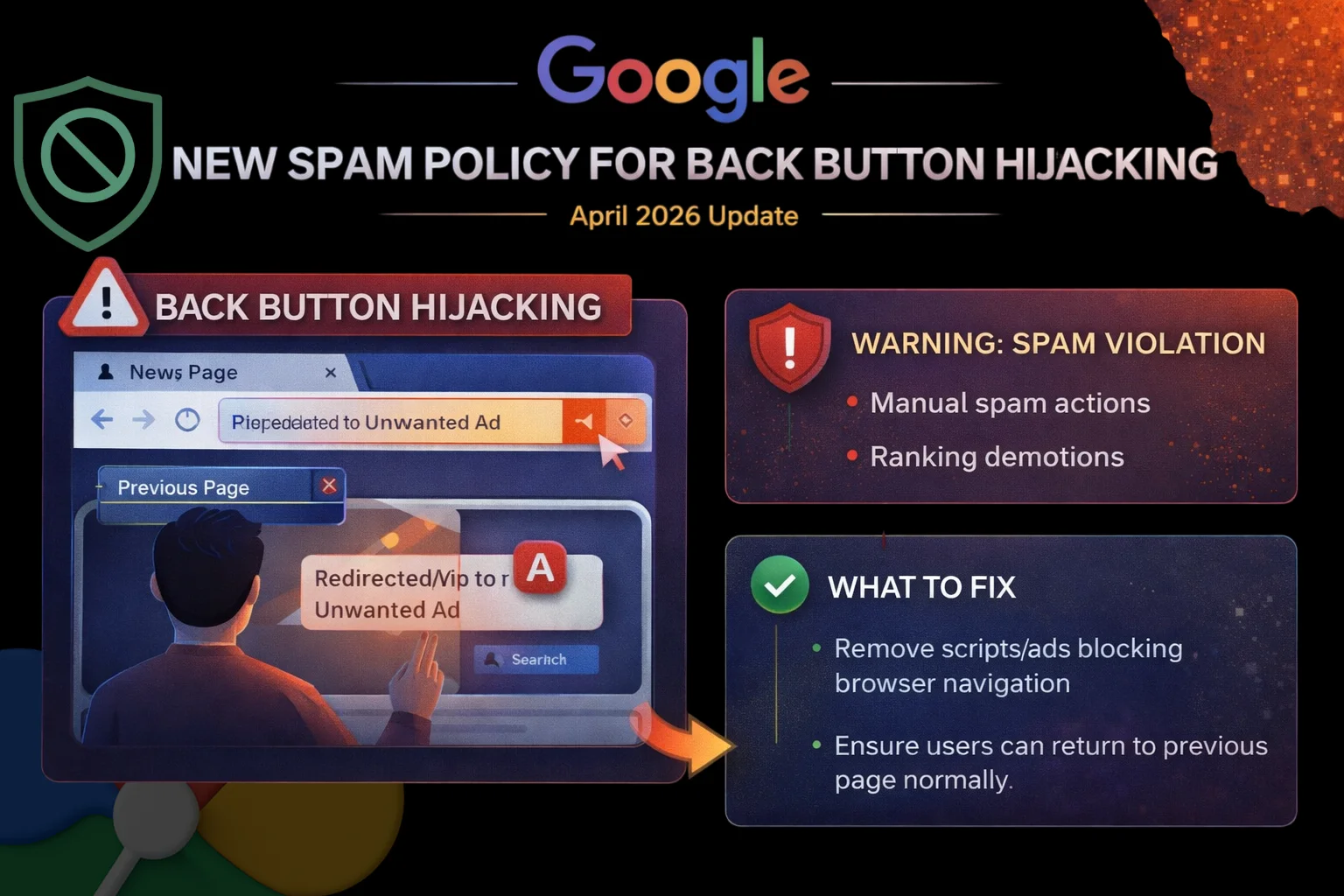
Google has officially introduced a new spam policy targeting a deceptive user behavior known as “back button hijacking.” The announcement was made on April 13, 2026, through the Google Search Central Blog.
According to Google, this behavior will now be treated as an explicit violation under its spam policies, specifically falling under malicious practices.
The company has also confirmed that enforcement will begin on June 15, 2026, giving website owners a limited window to review and fix any issues. (Source)
What Google Launched
Google has expanded its spam policies by formally defining and prohibiting back button hijacking.
This is not a new behavior — Google states that such practices were already considered problematic. However, this update makes it:
- Clearly defined
- Explicitly listed
- Directly enforceable
In simple terms, Google has moved this behavior from a “gray area” into a clear spam violation category. (Source)
What is Back Button Hijacking (Official Explanation)
Google defines back button hijacking as a practice where a website interferes with normal browser navigation.
When a user clicks the back button, they expect to return to the previous page. However, in hijacking scenarios:
- Users may be redirected to a page they never visited
- Ads or recommendation pages may appear
- The back button may not work as expected
- Users may get stuck in a navigation loop
This creates a mismatch between user expectation and actual behavior, which Google classifies as deceptive. (Source)
Why Google Is Taking Action
Google has made it clear that user experience is the primary reason behind this policy update.
According to the official statement:
- Back button hijacking breaks normal browsing behavior
- It creates confusion and frustration
- It manipulates users into unintended actions
- It reduces trust in websites
Google also noted that this behavior has been increasing, which led to the decision to explicitly define it as a violation. (Source)
How This Violates Google’s Policies
Google has categorized this under “malicious practices.”
This category includes behaviors that:
- Mislead users
- Manipulate navigation
- Create deceptive experiences
- Compromise user trust
Back button hijacking fits this definition because it alters how users interact with the browser itself, not just the website.
How It Works (Technical Understanding)
Back button hijacking usually happens through scripts or configurations that manipulate browser history.
Common mechanisms include:
- Injecting fake history entries
- Overriding browser navigation behavior
- Using JavaScript to redirect users repeatedly
- Blocking or delaying navigation events
These techniques create an illusion of navigation while actually controlling the user’s path.
Real Practical Examples
🔴 Example 1: Forced Redirect Loop
User clicks back → redirected to another page instead of original source.
🔴 Example 2: Ad Interception
User clicks back → sees an ad page instead of previous page.
🔴 Example 3: Navigation Trap
User clicks back → remains stuck on the same website due to script manipulation.
🟢 Correct Behavior (What Google Expects)
- Back button should return user to the actual previous page
- No interference with browser navigation
- No hidden redirects or injected history
Impact on Websites and SEO
This update has direct SEO implications.
Google clearly states that websites engaging in this behavior may face:
- Manual spam actions
- Automated ranking demotions
- Reduced visibility in search results
This means it is not just a UX issue — it is now a ranking risk.
What to Do If Your Website Is Affected
Google provides clear guidance for fixing this issue.
Step 1: Audit Your Website Behavior
Check:
- Does back button behave normally?
- Are users redirected unexpectedly?
- Are there navigation loops?
Step 2: Identify Problem Sources
The issue may come from:
- Custom scripts
- Third-party libraries
- Ad networks
- Plugins
Step 3: Remove or Disable Problematic Code
Google explicitly says:
👉 Any script interfering with browser navigation must be removed
Step 4: Test User Experience
- Navigate your site manually
- Use back button repeatedly
- Ensure normal behavior
Step 5: Submit Reconsideration (If Penalized)
If your site receives a manual action:
- Fix the issue
- Submit reconsideration request in Search Console
Important Hidden Risk: Third-Party Tools
Google highlights an important point:
👉 You may not even know this is happening
Some cases originate from:
- Ad scripts
- Embedded tools
- External libraries
This makes it critical to review your full tech stack, not just your own code.
How to Keep Your Website Safe
To stay compliant with this policy:
Follow these core principles:
- Never interfere with browser navigation
- Avoid forced redirects
- Use clean and transparent UX practices
- Review third-party integrations regularly
What to Avoid
- Manipulating browser history
- Injecting fake navigation states
- Blocking back button functionality
- Redirecting users without clear intent
Timeline & Rollout
- Announcement Date: April 13, 2026
- Enforcement Start: June 15, 2026
- Policy Type: Spam policy expansion
- Impact Scope: Global
Google has provided a grace period of approximately 2 months for website owners to fix issues before enforcement begins.
Key Insight: Why This Update Is Important
This update reflects a bigger shift:
👉 Google is now targeting UX manipulation as spam
Earlier focus:
- Content
- Links
Now also includes:
- User behavior manipulation
- Navigation control
FAQs
It is a practice where a website interferes with the browser’s back button behavior, preventing users from returning to the previous page and instead redirecting them or trapping them within the site.
Google has confirmed that enforcement will begin on June 15, 2026, giving site owners time to fix any issues.
Websites may face manual spam actions or automated ranking demotions, which can reduce their visibility in search results.
Yes. Google specifically mentions that ad platforms, libraries, or external scripts may be responsible, so it is important to audit all integrations.
You should manually test your website’s navigation. If clicking the back button leads to unexpected pages, redirects, or loops, your site may be violating this policy.
Author
Harshit Kumar is an AI SEO Specialist with 7+ years of experience and the founder of kumarharshit.in. He specializes in technical SEO, indexing systems, and breaking down Google updates into actionable insights.